
The Ultimate Guide to Quality Control in Manufacturing
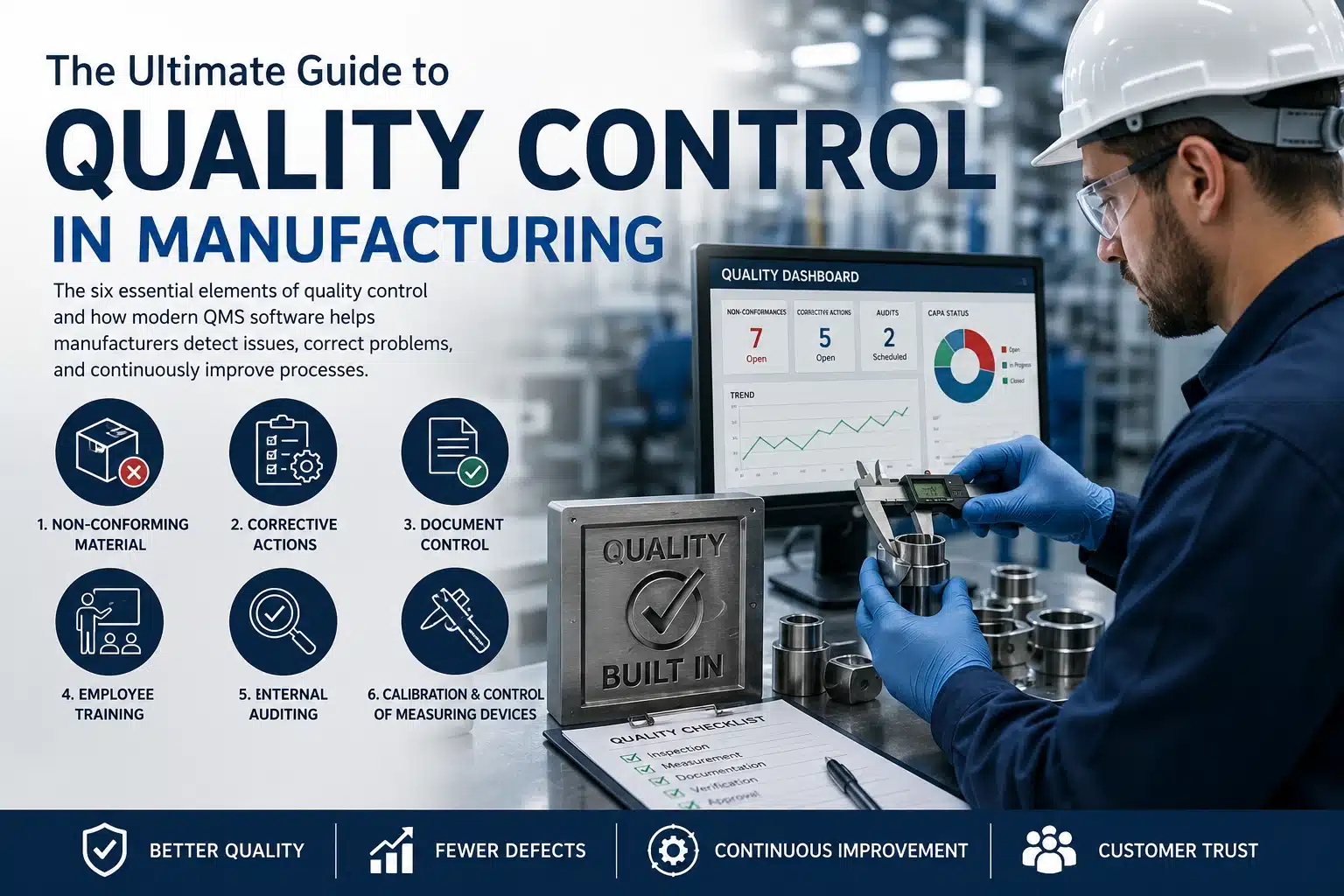
Quality control is the foundation of every successful manufacturing operation. This guide breaks down the six essential elements of quality control and how modern QMS software helps manufacturers detect issues, correct problems, and continuously improve processes.
What Is Quality Control in Manufacturing?
Quality control (QC) is the process of ensuring that manufactured products consistently meet customer requirements, engineering specifications, and regulatory standards. It includes inspections, testing, measurement, documentation, corrective actions, and continuous improvement activities that identify defects before products reach the customer.
An effective quality control system reduces scrap, minimizes rework, improves customer satisfaction, supports ISO 9001 and AS9100 compliance, and provides the data needed to continually improve manufacturing processes.
Modern manufacturers increasingly use integrated Quality Management Software (QMS) to automate inspections, document control, corrective actions, calibration, employee training, and internal auditing within a single centralized system.
Each of the six quality control elements works together to create a closed-loop quality management system. Inspection identifies problems, corrective actions eliminate root causes, document control ensures consistent procedures, employee training develops competency, internal auditing verifies compliance, and calibration ensures accurate measurements throughout production.
The 6 Major Elements of Quality Control in Manufacturing
1. Non-Conforming Material — Detect, Correct, and Improve
Every manufacturer encounters nonconforming or defective material. The key is how quickly and accurately you identify, record, segregate, and disposition that material. This process is so critical that it is one of the six documented procedures required by ISO 9001 and AS9100.
2. Corrective Actions — Solve Problems Before They Escalate
Corrective action processes help organizations document issues, identify root causes, implement solutions, and prevent recurrence. Effective corrective actions reduce waste, improve quality, and strengthen long‑term performance.
3. Document Control — Ensure the Right Documents Are Always in Use
Document control ensures employees always have access to the correct versions of procedures, drawings, specifications, and work instructions. Proper document control prevents errors and maintains compliance.
4. Employee Training — Skilled Workers Produce Quality Products
A strong training program equips employees with the knowledge and competencies required to perform their jobs effectively. Training records also demonstrate compliance during audits.
5. Internal Auditing — Find Weaknesses Before They Become Problems
Internal audits evaluate processes, identify gaps, and verify compliance with internal and external requirements. Proactive auditing strengthens quality, reduces risk, and drives continuous improvement.
6. Calibration & Control of Measuring Devices — Accuracy Starts With the Tools
A calibration program ensures that every measuring device is accurate, traceable, and reliable. Proper calibration prevents defects, ensures product conformity, and maintains customer trust.
Continue reading below for detailed breakdowns of each process.
Non-Conforming or Defective Material Process
All manufacturing companies encounter nonconforming material. The effectiveness of your process determines how quickly issues are contained and how well you protect customers, production flow, and compliance.
Record the Non-Conformance
- Part number
- Revision level
- Quantity and unit of measure
- Expected vs. actual condition
Segregate and Label Material
Nonconforming material must be removed from production areas to prevent accidental use. Red labels or paperwork provide a clear visual indicator that the material is not acceptable for use.
Notify the Appropriate Personnel
- Single‑click email notifications
- Photos and drawings for faster review
- Automatic to‑do list assignments
- Regular reports of outstanding actions
Disposition the Non-Conforming Material
- Use As‑Is
- Rework
- Return to Vendor
- Scrap
- Downgrade
Verify and Close the Non-Conformance
Verification ensures the chosen action was completed correctly. Closure records who completed the disposition and when.
Explore solutions: Inspection and NonConforming Material Software
Corrective Action: Strengthening Quality Through Root Cause Analysis
Corrective actions ensure that problems are identified, analyzed, resolved, and prevented from recurring. This process is one of the six documented procedures required by ISO 9001 and AS9100.
Common Uses of Corrective Action
- Addressing non‑conformities
- Preventing recurring defects
- Maintaining regulatory compliance
- Improving process efficiency
- Responding to customer complaints
- Resolving supplier issues
- Improving employee performance
- Addressing equipment failures
Strategies for an Effective Corrective Action Process
- Clearly identify the problem
- Perform root cause analysis (5 Whys, Fishbone, FMEA)
- Develop a detailed action plan
- Implement corrective actions
- Monitor effectiveness using KPIs
- Document the entire process
- Communicate and train employees
- Review and improve the CAP process
- Leverage QMS software for tracking
Explore solutions: Corrective Action (CAPA) Software
Corrective actions are often initiated from inspection failures, customer complaints, supplier issues, or findings identified during internal audits. They also work closely with Inspection & Non-Conforming Material Software to ensure issues are fully documented and verified.
Document Control: Ensuring Accuracy, Compliance, and Clarity
Document control ensures employees always have access to current, accurate, and compliant documents. It is one of the six documented procedures required by ISO 9001 and AS9100.
Strategies for an Effective Document Control System
- Use a centralized Document Management System (DMS)
- Implement strong version control
- Use role‑based access and audit trails
- Standardize naming conventions
- Establish approval workflows and review cycles
- Define retention and disposal policies
- Train employees on document access and updates
- Conduct regular audits
- Ensure compliance with ISO, FDA, and GMP
- Distribute documents efficiently and securely
- Manage supplier documentation
- Implement backup and disaster recovery plans
Explore solutions: Document Management (Control of Documents) Software
Controlled documents are referenced throughout your Quality Management System, including Employee Training, Inspection Control Plans, and Internal Auditing.
Employee Training: Building a Skilled and Confident Workforce
Employee training ensures your workforce has the skills and knowledge needed to maintain quality, safety, and efficiency. A well‑trained workforce is essential for long‑term manufacturing success.
Strategies for an Effective Training Program
- Use QMS software to manage training requirements
- Provide hands‑on training and simulations
- Focus on safety and compliance
- Create tailored training paths
- Use mentorship and peer learning
- Offer continuous learning opportunities
- Set clear objectives and performance metrics
- Cross‑train employees across roles
- Use digital tools and VR/AR training
- Provide regular feedback
- Encourage collaboration and innovation
- Build scalable and adaptive training programs
- Create a positive learning environment
Explore solutions: Employee Training Management Software
Training records should remain linked to documented procedures, controlled documents, and employee competency requirements. During internal audits, organizations can quickly verify that personnel have received the required training before performing quality-critical tasks.
Internal Auditing: Strengthening Quality from Within
Internal auditing provides a structured approach to evaluating and improving manufacturing processes. It is one of the six documented procedures required by ISO 9001 and AS9100.
Strategies for an Effective Internal Auditing Program
- Use QMS software to manage audits
- Build a competent audit team
- Conduct risk assessments
- Develop a clear audit plan
- Perform audit scoping and fieldwork
- Report findings and recommendations
- Ensure follow‑up and continuous improvement
- Leverage technology and analytics
- Stay updated on regulatory changes
Benefits of Internal Auditing
- Improved product quality
- Enhanced operational efficiency
- Reduced risk of non‑compliance
- Stronger culture of accountability
Explore solutions: Internal Auditing Software
Control of Measuring Devices (Calibration): Ensuring Accuracy and Reliability
Calibration ensures that all measuring devices used in manufacturing are accurate, reliable, and traceable. This is essential for maintaining product quality and meeting regulatory requirements.
Strategies for an Effective Calibration Program
- Use QMS software to manage calibration schedules
- Develop a comprehensive calibration plan
- Use certified calibration standards
- Implement regular calibration intervals
- Automate calibration processes
- Train calibration personnel
- Maintain detailed calibration records
- Perform regular calibration audits
- Outsource calibration when needed
- Use predictive maintenance
- Commit to continuous improvement
Benefits of a Strong Calibration Program
- Improved product quality and consistency
- Reduced defects and rework
- Enhanced customer satisfaction
- Compliance with industry standards
- Increased operational efficiency
Explore solutions: Calibration Management Software
Calibration activities support receiving inspection, in-process inspection, final inspection, and Inspection Control Plans by ensuring measuring equipment remains accurate and traceable.
Why Integrated Quality Management Software Improves Manufacturing Performance
Many manufacturers begin with separate spreadsheets, paper forms, and standalone applications for inspections, corrective actions, document control, training, and calibration. As production grows, disconnected systems make it difficult to maintain traceability and respond quickly to quality issues.
An integrated Quality Management System (QMS) centralizes quality processes into a single database, allowing quality managers, inspectors, engineers, supervisors, and auditors to work from the same information in real time. This reduces duplicate data entry, improves reporting, simplifies audits, and provides complete visibility into quality performance.
- Centralized quality records
- Shared document control
- Automated corrective action tracking
- Integrated employee training
- Inspection traceability
- Audit readiness
- Real-time reporting dashboards
Our Flagship QA Suite Software Package
The QA Suite combines all modules into a single, seamless, audit‑ready Quality Management System. It is ideal for organizations seeking a unified ISO9001 or AS9100 solution with consistent workflows, centralized data, and complete traceability.
- One login, one database, one integrated workflow
- All modules communicate with each other
- Open‑source Microsoft Access front‑end
- Access or SQL Server Express back‑end
- Fully customizable to your processes
Our Basic QA Suite Includes
- Corrective Action Management
- Document Control Management
- Inspection and NonConforming Material Management
- Employee Training Management
- Internal Auditing Management
- Calibration Management
Optional Modules for our QA Suite Include
- Contract Review Management
- Inpsection Control Plan Management
- First Article Inspection (FAI) Management
- Preventive Maintenance Management
Explore solutions: QA Suite Software | SimpleManufacturing™ ERP
Built From Real Manufacturing Experience
Our Quality Management Software has been developed through years of supporting manufacturers in aerospace, electronics, machining, contract manufacturing, medical devices, and other regulated industries. Every module reflects real-world manufacturing workflows and supports ISO 9001 and AS9100 compliance requirements while remaining fully customizable to your organization's processes.
Frequently Asked Questions About Quality Control
What is the purpose of quality control?
The primary purpose of quality control is to identify and prevent defects before products reach customers. Effective quality control improves consistency, reduces waste, and helps organizations meet regulatory and customer requirements.
What is the difference between Quality Control (QC) and Quality Assurance (QA)?
Quality Control focuses on inspecting products and identifying defects. Quality Assurance focuses on improving the processes that create those products. Most manufacturers implement both QA and QC as part of a complete Quality Management System.
How does ISO 9001 relate to quality control?
ISO 9001 requires organizations to establish documented processes that ensure products consistently meet customer requirements. Quality control activities such as inspections, corrective actions, document control, calibration, training, and internal audits all support ISO 9001 compliance.
Can Microsoft Access be used for Quality Management Software?
Yes. Microsoft Access provides an excellent platform for developing customizable Quality Management Software. When paired with SQL Server, it offers excellent scalability, reliability, and multi-user performance for manufacturing environments.
Strengthen Your Quality Control Process
Our integrated QMS and manufacturing software solutions streamline non‑conformance management, corrective actions, calibration, training, document control, and internal auditing — all in one platform.
Contact Us for a Live Demo