Access to SQL Server Migration Process: Steps, Best Practices, and Pitfalls
Access to SQL Server Migration Process and Steps
Migrating from Microsoft Access to SQL Server is one of the most effective ways to improve database performance, reliability, and scalability. This guide walks through the complete Access to SQL Server migration process used by successful organizations.
Why Migrate from Access to SQL Server?
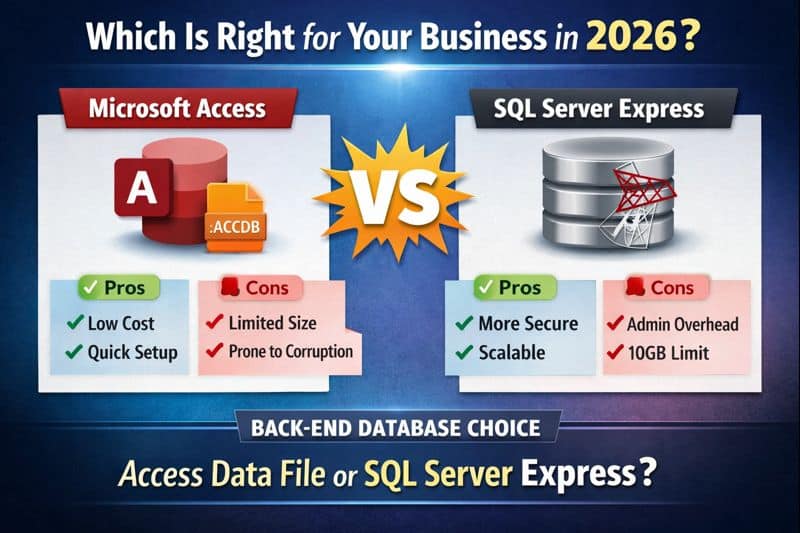
While Microsoft Access works well for small systems, it was never designed to handle high concurrency, large datasets, or business-critical workloads. SQL Server provides a true client-server architecture that eliminates many of the risks associated with file-based databases.
- Improved multi-user performance
- Reduced risk of database corruption
- Stronger security and auditing
- Reliable backup and recovery
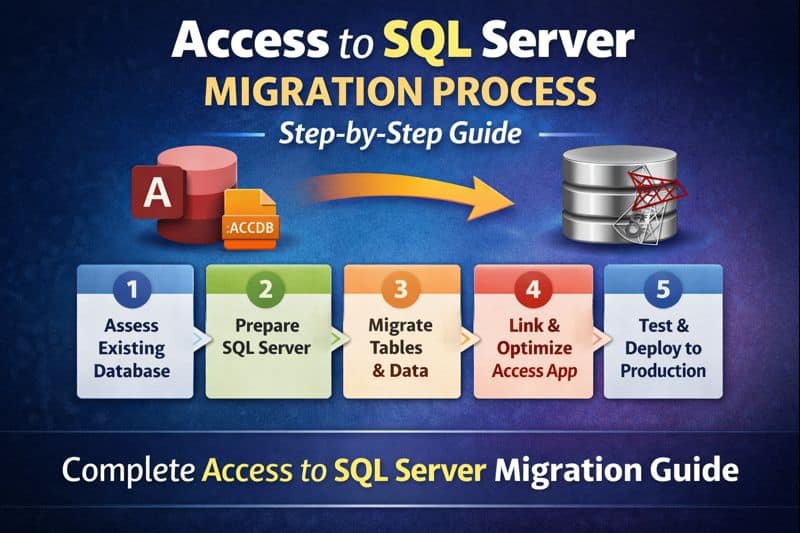
Overview of the Access to SQL Server Migration Process
A successful migration is not just about moving tables. It requires planning, testing, and careful validation to avoid downtime and data issues.
- Assessment and planning
- Schema and data migration
- Application updates
- Testing and validation
- Deployment and optimization
Step 1: Assess the Existing Access Database
The first step is understanding what you already have. This includes reviewing:
- Table structures and relationships
- Data volume and growth rate
- Queries, forms, and reports
- Business rules embedded in VBA
- Review Temp, Local and Linked Tables
- Determine if Temp or Local Tables can be moved to the SQL Server
- Good Time to Delete Tables no longer used
Skipping this step often leads to performance problems or broken functionality after migration.
Step 2: Prepare SQL Server
Next, SQL Server must be properly configured before any data is moved. For many organizations, SQL Server Express is a cost-effective starting point.
- Install Latest Version of SQL Server Express on a Local Network Server
- Install latest version of SQL Server Management Studio (SSMS) on a Local Server
- Create the database and security roles
- Define naming conventions
- Configure backups and maintenance
- Set appropriate permissions
Access vs SQL Server Field Type Differences
When migrating from Microsoft Access to SQL Server, understanding how field (data) types differ is critical. While many types appear similar, there are important behavioral and formatting differences that affect performance, accuracy, and application logic.
Core Data Type Mapping
| Microsoft Access Field Type | SQL Server Data Type | Notes |
|---|---|---|
| Short Text | VARCHAR(n) / NVARCHAR(n) | Use NVARCHAR for Unicode support |
| Long Text (Memo) | VARCHAR(MAX) / NVARCHAR(MAX) | Memo fields convert to MAX types |
| Number (Byte) | TINYINT | Range 0–255 |
| Number (Integer) | SMALLINT | 2-byte integer |
| Number (Long Integer) | INT | Most common numeric mapping |
| Number (Single) | REAL | Floating-point precision |
| Number (Double) | FLOAT | Watch rounding differences |
| Number (Decimal) | DECIMAL(p,s) | Precision and scale must be defined |
| Currency | MONEY or DECIMAL(19,4) | DECIMAL is preferred for financial accuracy |
| Date/Time | DATETIME / DATETIME2 | DATETIME2 is recommended |
| Yes/No | BIT | Access uses -1/0, SQL uses 1/0 |
| AutoNumber | INT IDENTITY(1,1) | IDENTITY replaces AutoNumber |
| Hyperlink | VARCHAR(MAX) | Stored as text |
| Attachment | VARBINARY(MAX) | Often better stored externally |
| OLE Object | VARBINARY(MAX) | Strongly discouraged |
| Lookup Wizard | Not a true data type | Convert to foreign key relationships |
| Replication ID (GUID) | UNIQUEIDENTIFIER | Same concept in SQL Server |
| Calculated | Computed Column or View | Often moved to SQL logic |
Key Behavioral Differences to Watch For
- Yes/No fields: Access stores True as -1, while SQL Server uses 1.
- Date precision: SQL Server DATETIME2 offers higher precision and a wider range.
- Text fields: Memo fields must be converted to VARCHAR(MAX) or NVARCHAR(MAX).
- Currency: DECIMAL(19,4) is safer than MONEY for financial data.
- Lookup fields: Must be redesigned using foreign keys and JOINs.
Recommended Best-Practice Mappings
- Short Text → NVARCHAR(n)
- Long Text → NVARCHAR(MAX)
- Date/Time → DATETIME2
- Currency → DECIMAL(19,4)
- Yes/No → BIT
- AutoNumber → INT IDENTITY
Common Issues with Access Data
- Invalid Date Entered Into a Text Field
- No Primary Key Defined in Access Table
Step 3: Migrate Tables and Data
Tables are migrated from Access to SQL Server using tools such as SQL Server Migration Assistant (SSMA), SQL Server 32 or 64 Bit Import Wizard, or custom scripts.
- Convert data types correctly
- Preserve primary keys and indexes
- Rebuild relationships using foreign keys
- Validate record counts and data integrity
Common Issues After Import Process
- Primary Key Not Defined
- No Default Value Added for Bit fields (After setting Default Value Must Update Null fields to either 1 or 0.)
- 'Allow Nulls' setting may not match Business Rules
Step 4: Update the Access Front-End
Most organizations keep Microsoft Access as the front-end application. The Access file is updated to link to SQL Server tables instead of local data.
- Replace local tables with linked tables
- Optimize queries for SQL Server
- Move business logic to stored procedures where appropriate
Step 5: Test, Optimize, and Deploy
Thorough testing is critical before going live. This includes functional testing, performance testing, and user acceptance testing.
- Verify reports and exports
- Test multi-user performance
- Review execution plans and indexes
- Train users on any workflow changes
Common Migration Pitfalls to Avoid
- Upsizing without redesigning queries
- Ignoring security and permissions
- Failing to test under real-world load
- Leaving too much logic in Access VBA
Should You Migrate Yourself or Hire an Expert?
Simple databases can sometimes be migrated internally. However, complex systems, multi-user environments, and regulated industries benefit greatly from expert guidance.
Our Access to SQL Server migration services focus on minimizing risk, preserving existing workflows, and delivering a scalable solution.
Free Access to SQL Server Migration Review
Not sure where to start or whether your database is ready? Get expert insight before making changes.
Schedule a free database architecture review