Access to SQL Server Migration Process: Steps, Best Practices, and Pitfalls

Access to SQL Server Migration Process: Steps, Best Practices, and Pitfalls

Access to SQL Server Migration Process: Steps, Best Practices, and Pitfalls

Access to SQL Server Migration Process and Steps

Migrating from Microsoft Access to SQL Server is one of the most effective ways to improve database performance, reliability, and scalability. This guide walks through the complete Access to SQL Server migration process used by successful organizations.

Why Migrate from Access to SQL Server?

While Microsoft Access works well for small systems, it was never designed to handle high concurrency, large datasets, or business-critical workloads. SQL Server provides a true client-server architecture that eliminates many of the risks associated with file-based databases.

  • Improved multi-user performance
  • Reduced risk of database corruption
  • Stronger security and auditing
  • Reliable backup and recovery

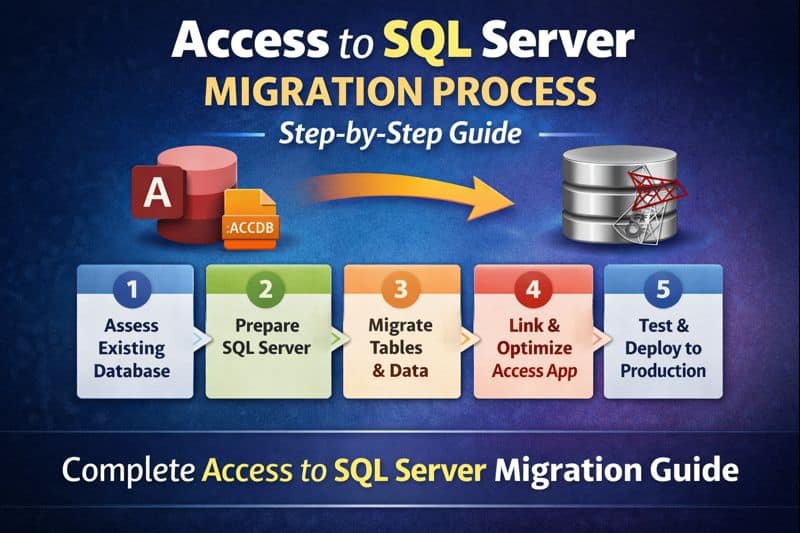
Overview of the Access to SQL Server Migration Process

A successful migration is not just about moving tables. It requires planning, testing, and careful validation to avoid downtime and data issues.

  • Assessment and planning
  • Schema and data migration
  • Application updates
  • Testing and validation
  • Deployment and optimization

Step 1: Assess the Existing Access Database

The first step is understanding what you already have. This includes reviewing:

  • Table structures and relationships
  • Data volume and growth rate
  • Queries, forms, and reports
  • Business rules embedded in VBA
  • Review Temp, Local and Linked Tables
  • Determine if Temp or Local Tables can be moved to the SQL Server
  • Good Time to Delete Tables no longer used

Skipping this step often leads to performance problems or broken functionality after migration.

Step 2: Prepare SQL Server

Next, SQL Server must be properly configured before any data is moved. For many organizations, SQL Server Express is a cost-effective starting point.

  • Install Latest Version of SQL Server Express on a Local Network Server
  • Install latest version of SQL Server Management Studio (SSMS) on a Local Server
  • Create the database and security roles
  • Define naming conventions
  • Configure backups and maintenance
  • Set appropriate permissions

Access vs SQL Server Field Type Differences

When migrating from Microsoft Access to SQL Server, understanding how field (data) types differ is critical. While many types appear similar, there are important behavioral and formatting differences that affect performance, accuracy, and application logic.

Core Data Type Mapping

Microsoft Access Field Type SQL Server Data Type Notes
Short Text VARCHAR(n) / NVARCHAR(n) Use NVARCHAR for Unicode support
Long Text (Memo) VARCHAR(MAX) / NVARCHAR(MAX) Memo fields convert to MAX types
Number (Byte) TINYINT Range 0–255
Number (Integer) SMALLINT 2-byte integer
Number (Long Integer) INT Most common numeric mapping
Number (Single) REAL Floating-point precision
Number (Double) FLOAT Watch rounding differences
Number (Decimal) DECIMAL(p,s) Precision and scale must be defined
Currency MONEY or DECIMAL(19,4) DECIMAL is preferred for financial accuracy
Date/Time DATETIME / DATETIME2 DATETIME2 is recommended
Yes/No BIT Access uses -1/0, SQL uses 1/0
AutoNumber INT IDENTITY(1,1) IDENTITY replaces AutoNumber
Hyperlink VARCHAR(MAX) Stored as text
Attachment VARBINARY(MAX) Often better stored externally
OLE Object VARBINARY(MAX) Strongly discouraged
Lookup Wizard Not a true data type Convert to foreign key relationships
Replication ID (GUID) UNIQUEIDENTIFIER Same concept in SQL Server
Calculated Computed Column or View Often moved to SQL logic

Key Behavioral Differences to Watch For

  • Yes/No fields: Access stores True as -1, while SQL Server uses 1.
  • Date precision: SQL Server DATETIME2 offers higher precision and a wider range.
  • Text fields: Memo fields must be converted to VARCHAR(MAX) or NVARCHAR(MAX).
  • Currency: DECIMAL(19,4) is safer than MONEY for financial data.
  • Lookup fields: Must be redesigned using foreign keys and JOINs.

Recommended Best-Practice Mappings

  • Short Text → NVARCHAR(n)
  • Long Text → NVARCHAR(MAX)
  • Date/Time → DATETIME2
  • Currency → DECIMAL(19,4)
  • Yes/No → BIT
  • AutoNumber → INT IDENTITY

Common Issues with Access Data

  • Invalid Date Entered Into a Text Field
  • No Primary Key Defined in Access Table

Step 3: Migrate Tables and Data

Tables are migrated from Access to SQL Server using tools such as SQL Server Migration Assistant (SSMA), SQL Server 32 or 64 Bit Import Wizard, or custom scripts.

  • Convert data types correctly
  • Preserve primary keys and indexes
  • Rebuild relationships using foreign keys
  • Validate record counts and data integrity

Common Issues After Import Process

  • Primary Key Not Defined
  • No Default Value Added for Bit fields (After setting Default Value Must Update Null fields to either 1 or 0.)
  • 'Allow Nulls' setting may not match Business Rules

Step 4: Update the Access Front-End

Most organizations keep Microsoft Access as the front-end application. The Access file is updated to link to SQL Server tables instead of local data.

  • Replace local tables with linked tables
  • Optimize queries for SQL Server
  • Move business logic to stored procedures where appropriate

Step 5: Test, Optimize, and Deploy

Thorough testing is critical before going live. This includes functional testing, performance testing, and user acceptance testing.

  • Verify reports and exports
  • Test multi-user performance
  • Review execution plans and indexes
  • Train users on any workflow changes

Common Migration Pitfalls to Avoid

  • Upsizing without redesigning queries
  • Ignoring security and permissions
  • Failing to test under real-world load
  • Leaving too much logic in Access VBA

Should You Migrate Yourself or Hire an Expert?

Simple databases can sometimes be migrated internally. However, complex systems, multi-user environments, and regulated industries benefit greatly from expert guidance.

Our Access to SQL Server migration services focus on minimizing risk, preserving existing workflows, and delivering a scalable solution.

Free Access to SQL Server Migration Review

Not sure where to start or whether your database is ready? Get expert insight before making changes.

Schedule a free database architecture review

Microsoft Access vs SQL Server: Which Is Right for Your Business in 2026?

Microsoft Access vs SQL Server: Which Is Right for Your Business in 2026?

Microsoft Access vs SQL Server: Which Is Right for Your Business in 2026?

Microsoft Access vs SQL Server: Which Is Right for Your Business in 2026?

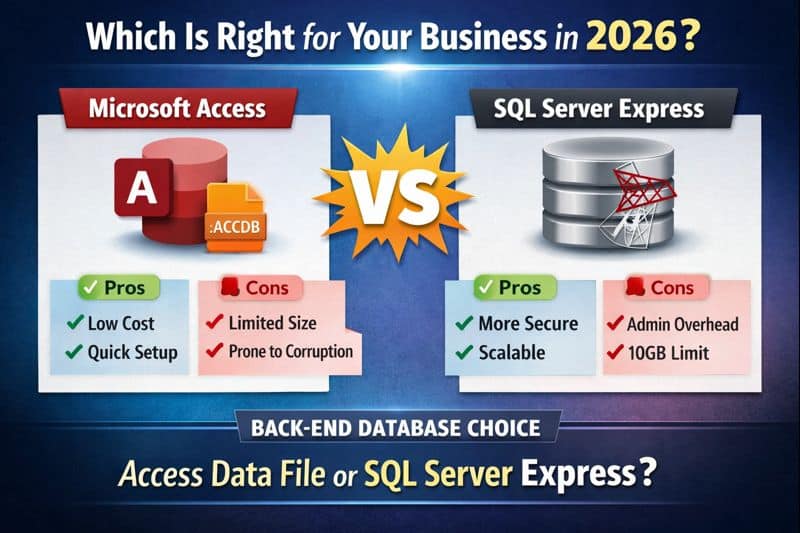
Access vs SQL Server is a critical decision for growing businesses. If you are already evaluating Microsoft Access to SQL Server migration, understanding the strengths and limitations of each database back-end is the first step.

The Real Comparison: Database Back-End Choices

This article focuses strictly on the data layer:

  • Microsoft Access (.accdb) data file
  • SQL Server Express

Microsoft Access as a Database Back-End

Advantages

  • Fast deployment
  • No server required
  • Low cost - Option of Office 365
  • Simple for small teams
  • No IT Involvement Needed!
  • Easy to Make Design Changes / Enhancements
  • No SQL Server Experience Needed

Disadvantages

  • As Simultaneous Users Grow and Number of Records Increase, Access JET Engine performance degrades
  • Higher corruption risk
  • Weak security and auditing
  • Not Designed to be used as Cloud-Based or on External Servers
  • Design Changes Require All Users to be Disconnected

SQL Server Express as a Database Back-End

Advantages

  • FREE from Microsoft!
  • Excellent multi-user performance - SQL Server design to Process Data Efficiently and FAST
  • Client-server architecture
  • Advanced Security
  • Reliable backup and recovery
  • Excellent Data-Integrity using Validation TRANSACTION, COMMIT, TRY and CATCH prior to data add, delete, edits
  • Use SQL Server Management Studio (SMSS) to manage Database Design - FREE From Microsoft!
  • Reliability and Up-Time

Disadvantages

  • 10GB database size limit
  • Requires server administration - IT Involvement - That can be a Show-Stopper or Benefit depending on IT Knowledge
  • Requires SQL Server Knowledge and Experience - Different then VBA

Access vs SQL Server Express Comparison

Feature Access SQL Server Express
ArchitectureFile-basedClient-server
Multi-userLimitedStrong
SecurityBasicAdvanced
ScalabilityLowModerate
CostIncludedFree

Which Should You Choose?

For many organizations, the best long-term solution is to keep Microsoft Access as the front-end while migrating data to SQL Server. Our Access to SQL Server migration services are designed to improve performance, security, and reliability without disrupting users.

Next step: Learn how a properly planned Access to SQL Server migration can eliminate performance issues while preserving your existing Access application.

Free Database Architecture Review

Not sure which option is right for your business? We specialize in designing and implementing Access to SQL Server migration strategies that scale with your organization.

Schedule a free database architecture review

The Ultimate Guide to Quality Control in Manufacturing [ 6 Key Elements ]

The Ultimate Guide to Quality Control in Manufacturing [ 6 Key Elements ]

What are the 6 Major Quality Control Elements Within Manufacturing and QMS Software?

Non-Conforming Material – Detect, Correct, and Perfect!

We Will Discuss How You Can Quickly Identify, Record, and Disposition Non-Conforming or Defective Material

Corrective Actions – Problem Found, Solution Bound!

Use proven corrective action processes to control Your Company’s quality issues before they escalate. Document, address, and resolve problems to prevent reoccurrence and improve your bottom line overall.

Control of Documents – Keep Docs in Check, Avoid the Wreck!

Streamline Your Document Control process by managing your documents to ensure users always have the correct documents.

Employee Training – Knowledge in Hand, Quality at Command!

Build a Training Program to equip workers with the necessary skills, knowledge, and competencies to perform their jobs effectively.

Internal Auditing – Find the Flaws, Strengthen the Cause!

Master the art of manufacturing through meticulous, proactive internal audits. Prioritize excellence by conducting thorough internal audits, scrutinizing every detail, ensuring compliance, enhancing quality, and driving continuous improvement.

Calibration or Control of Measuring Devices – Control Your Tools, Control Your Quality!

Ensure every measurement is accurate by controlling measuring devices through a Calibration Program that calibrates regularly, guaranteeing the reliability and excellence of production.

Continue Reading Below For More Details….

Quality Control

Book a DEMO Now!

858-335-6421

Non-Conforming or Defective Material Process: [Transforming Defects into Perfection]

Let’s face reality. All Manufacturing Companies will encounter nonconforming or defective material. How you process this material is critical. It is so essential that it is one of six documented procedures required by ISO9001 and AS9100.

Strategies for Effective Non-Conforming Material Process:

Using Quality Control Software, Record the Non-Conformance or the Defect:

Part Number
Revision level
Non-conformance or Defective Quantity and Unit of Measure
Identify the Expected Condition and the Actual Condition


Segregate and Label Material:

Removing the Material from the Immediate Environment is a must. This ensures that we do not mistakenly use it in production. Whether that is a dedicated shelf, room, or area is entirely up to the company.

You should package, group, and/or label the material. Identified as nonconforming. Red Labels or Red Paperwork visually appear as “Stop” or “Bad.”


Notification of Non-Conformance or Defect:

  • Single-Click Email to a Selected Group of People.
    • Email should include all of the information about the Non-Conformance or Defect.
      • Part Number
        Revision
        Quantity
        Non-Conformance or Defect Details
        Pictures and drawings included in the Email help facilitate quicker review.
  • Automatically Appear in To-Do Lists
    • Automatically include items in to-do lists and regularly send out reports with outstanding action items.


Disposition of Non-Conforming Material and Defects:

Vested parties should consider how to process the nonconforming material. In Manufacturing, those vested groups are Sales, Materials, Supply Chain, Production, Engineering, Quality, and Finance. This ensures the overall disposition of the non-conformance or defect is in the company’s and customer’s best interest.

    • Step 1 – Verification of the Non-Conformance or Defect.
      • All Parties Should Agree that this is a non-conformance or defect.
    • Step 2 – Determine Disposition of Non-Conforming or Defective Material
      • Use As-Is (Concluded to be Conforming),
      • Rework,
      • Return To Vendor,
      • Scrap
      • Downgrade
      • Etc.,


Complete Disposition:

This might require the creation of a Supplier RMA or an internal Rework Work Order. In both cases, include a process for tracking the progress of these steps to monitor and see them through completion.


Verification of Disposition:

Verify the Dispositioning Action is complete.

    • Use As-Is:
      • Verify the product returned to the point of being deemed nonconforming or defective.
    • Rework:
      • Verify that the team performed and inspected the rework to ensure they removed the non-conformance.
    • Return To Vendor:
      • Verify the product was returned to the vendor and that the appropriate action was completed and verified. Whether it be a:
      • Vendor Credit Issued or
      • Rework or Exchange of Product and that it is Inspected and Accepted
    • Scrap:
      • The product was moved to scrap. Include the necessary actions such as destruction, disposal, and completion of accounting transactions.
    • Downgrade:
      • The product was re-labeled and re-identified, and necessary business software transactions were completed.


Closure:

Record the Non-Conformance is complete, who completed it, and when it was completed.

Corrective Action: [Quality Assurance through Corrective Action]

Another reality. All Manufacturing Companies will encounter issues that require addressing. It is so essential that it is also one of six documented procedures required by ISO9001 and AS9100.

Typical Usages of the Corrective Action Process (CAP) in Manufacturing are:

Addressing Non-Conformities:

CAP helps identify the root cause and implement corrective actions when a product or process fails to meet specifications. For example, if a product fails a quality test, CAP helps determine why it happened and ensures it doesn’t repeat.

Preventing Defects in Production:

Use CAP to find and fix defects by adjusting equipment, materials, or methods. If defects keep occurring, CAP analyzes the problem and takes action to fix the root cause.

Compliance with Industry Standards:

Many industries have strict standards (like ISO 9001, FDA regulations, etc.). Use CAP to ensure that manufacturing processes are compliant. Employ it to correct issues and bring processes back into compliance if any regulatory breach occurs.

Improving Process Efficiency:

When production delays or waste occur, CAP helps identify and fix the causes, making processes more efficient.

Customer Complaints and Returns:

If a customer returns a product or complains, start the Corrective Action Process to fix the issue. This process can help protect the brand’s reputation and reduce future returns.

Supplier Quality Issues:

If a supplier’s material is defective, use CAP to find the cause and fix the issue.

Employee Training and Performance:

If employees make errors or skip procedures, we use CAP to find training gaps and fix them with extra training or process changes.

Equipment Maintenance and Failure:

CAP is used when equipment malfunctions or repairs that impact product quality are required. Corrective actions could involve recalibrating equipment, replacing faulty parts, or instituting new preventive maintenance routines.

Preventing Recurrence of Failures:

After fixing an issue, CAP helps set controls to prevent it from happening again. For example, if packaging causes damage, you could use new materials or methods to stop it.

The Corrective Action Process is key to fixing and preventing the problem in all these cases. It involves defining the problem, analyzing root causes, implementing corrective actions, and verifying the effectiveness of those actions.


Strategies for Effective Corrective Action Process:

Using Quality Control Software, Identify the Problem Clearly:

Ensure the issue is well-defined and documented. Accurately and distinctly identify the Issue discovered or encountered. This may also include identifying attributes like Part Number, Work Order Number, etc. Consider using these attributes in a Corrective Action to create Pareto Charts to recognize top contributors.

Root Cause Analysis:

The Root Cause Analysis (RCA) step is crucial for finding the real causes of a problem, not just its symptoms.

Analyze the Problem:

Use tools like 5 Whys, Fishbone Diagram, or FMEA to find the root causes. This involves asking “why” multiple times to dig deeper into the factors contributing to the problem.

Identify Root Causes:

Identify the cause(s) of the issue, such as process failure, equipment malfunction, human error, or other problems.

Develop a Detailed Action Plan:

Outline the steps to address the root cause and prevent recurrence. Assign responsibilities and set deadlines for each task.

Implement Corrective Actions:

Execute the action plan and ensure all relevant personnel are informed and involved.

Monitor and Measure Effectiveness:

Track the implementation of corrective actions and evaluate their impact on the issue. Use key performance indicators (KPIs) to assess the effectiveness.

Document the Process:

Keep detailed records of the problem, root cause analysis, action plan, and results. This documentation can be helpful for future reference and continuous improvement.

Communicate and Train:

Ensure all employees know the corrective actions and understand their roles in preventing future issues. Provide training if necessary.

Review and Improve:

Review the corrective action process regularly to identify areas for improvement. Incorporate feedback from employees and stakeholders to refine the process.

Leverage Technology:

Use software tools to manage and track corrective actions, ensuring transparency and accountability.

These strategies help create a strong corrective action process that improves quality, reduces defects, and increases efficiency. Evaluating corrective actions fixes the issue, solves the cause, and drives improvements.

Control of Documents or Document Control: [Document Control: From Chaos to Clarity]

Document control in manufacturing refers to managing all documents and records related to manufacturing processes, operations, and quality control. It makes sure the right people have access to current, compliant documents. This is crucial for maintaining consistent quality, ensuring compliance, and improving efficiency in manufacturing. It is so essential that it is also one of six documented procedures required by ISO9001 and AS9100.

It is so essential that it is also one of six documented procedures required by ISO9001 and AS9100.

Here’s an overview of document control in manufacturing:

Strategies for an Effective Document Control System in Manufacturing:

A practical document control system in manufacturing is essential for maintaining consistency, quality, and compliance with regulatory standards.

To ensure your system is efficient, organized, and sustainable, here are some key strategies:

Use Quality Control Software as the Centralized Document Management System (DMS)

Digital Storage: Implement a centralized electronic document management system (DMS) to store all documents digitally. This ensures easy access, updates, and tracking.

Cloud or Local Servers:

Choose cloud or local storage based on security, access, and expandability needs. Cloud systems offer easier access across locations.

Search and Retrieval:

Make sure the DMS has a strong search feature to find documents by title, version, or keywords

Version Control

Track Changes:

Assign version numbers and revision dates to every document. This will allow users to track changes and ensure everyone uses the most current version.

Automated Notifications:

Set up automatic notifications to alert stakeholders when you update a document.

Access Control and Security

Role-Based Access:

Create a system where only authorized personnel members can access, modify, or approve documents based on their roles. For example, production workers might only have access to work instructions, while managers can access SOPs and policies.

Audit Trails:

Maintain a complete audit trail that tracks who accessed, modified, or approved a document and when. This ensures accountability and tracking.

Standardized Naming and Sorting

Consistent Naming Conventions:

Establish transparent and standardized document naming conventions. For example, the file name could include details like document type, department, version, and date, such as “SOP_Welding_RevA_2025-02-17.”

Grouping and Tagging:

Organize documents and use tags to simplify sorting and filtering in the system

Approval and Review Processes

Document Approval Workflow:

Set up approval workflows where authorized individuals review and approve documents before finalizing and sharing them.

Review Cycle:

Set up regular document reviews (e.g., annually or every two years) to keep them accurate and relevant. Assign responsible personnel to manage these reviews.

Clear Document Retention and Disposal Policies

Retention Schedule:

Create a document retention policy that defines how long to keep each document based on legal or regulatory needs.

Archiving and Disposal:

If documents are no longer needed, archive or securely dispose of them according to compliance regulations.

Training and Awareness

Employee Training:

Train employees regularly on the importance of document control and how to use the system. This helps ensure that everyone consistently uses the system across the organization.

Updates on Procedures:

Ensure all employees are aware of document updates affecting their work and know how to access the latest versions.

Continuous Improvement and Feedback

Feedback Mechanism:

Create a feedback loop where employees can report issues or improvements related to document control. This could include problems accessing documents or suggestions for improving the system.

Regular Audits:

Conduct internal audits of the document control system to ensure compliance, identify gaps, and determine areas for improvement.

Compliance with Industry Standards and Regulations

Adhere to Standards:

Ensure the document control system complies with relevant regulatory standards, such as ISO 9001 (Quality Management), FDA regulations, or GMP (Good Manufacturing Practices).

Tracking for Audits:

Ensure all documents are traceable and properly archived for external audits, with clear documentation of approval and revision history.

Effective Communication and Distribution

Document Distribution:

Once documents are approved, quickly distribute them to relevant employees. This could be through automated email notifications or system-generated alerts.

Access Control During Distribution:

Make sure only authorized personnel can modify or approve documents while others can read and follow them

Document Control for Suppliers and External Partners

Supplier Documents:

Ensure external suppliers or contractors follow document control procedures, such as submitting updated specifications, certifications, and drawings through the same system

Supplier Audits:

Audit supplier documentation practices to ensure that their control over documents meets your standards for quality and compliance.

Backup and Disaster Recovery Plans

Regular Backups:

Implement a regular backup strategy to prevent data loss in case of system failure. You should store backups securely and ensure you can quickly restore them.

Disaster Recovery Plan:

Make a disaster recovery plan for the document management system to recover critical documents during an IT failure.

Employee Training: [Crafting Champions of Manufacturing]

Employee training is the cornerstone of success in the manufacturing industry. Investing in training is crucial in an environment where precision, safety, and efficiency are key. It ensures you equip your workforce with the skills and knowledge to meet challenges head-on and stay ahead of industry trends.

Training enhances our employees’ technical abilities and understanding of their critical role in driving quality, productivity, and innovation. As manufacturing technology evolves, ongoing training keeps our team updated with the latest equipment, software, and best practices, ensuring we remain competitive and adaptable.

Moreover, training fosters a strong culture of safety. Educating employees on the importance of safety protocols and practices reduces workplace accidents, increases functional efficiency, and maintains a healthy work environment.

A well-trained workforce is at the core of manufacturing success. With skilled employees, you can consistently meet production goals and improve product quality, ultimately contributing to the company’s overall success. When your employees succeed, the entire organization thrives.

That’s why employee training is not just an investment in skills—it’s an investment in your future.

Strategies for Effective Employee Training Program in Manufacturing

To create an effective employee training program in manufacturing, it’s essential to use a well-rounded approach. This approach should meet the industry’s unique needs while promoting ongoing growth. Here are several key strategies for developing and executing a successful training program:

Use Quality Control Software to Manage Training, Training Records and Requirements

Manage training items, frequency of training and each employees training requirements using an efficient employee training module. Make sure there are automated reporting and emails for all upcoming and expired training needs.

Hands-On Training & Simulation

Why: Manufacturing is hands-on, and employees learn best by doing. Practical, real-world scenarios ensure that they understand how their training applies.

How: Use equipment simulations, role-playing, or mock production lines to help employees practice their skills. This allows them to train in a safe environment before working on the machines.

Focus on Safety and Compliance

Why: Manufacturing environments have significant safety risks. Employees must understand safety procedures to reduce hazards and protect themselves and their coworkers.

How: Incorporate safety protocols and compliance training into the daily routine. Regularly update employees on safety standards, emergency procedures, and personal protective equipment (PPE) usage.

Tailored Training Paths

Why: Employees may have different skill levels so that one-size-fits-all training won’t work for everyone. Customizing training paths helps individuals grow at their own pace.

How: Assess employees’ skills and create training programs that meet their needs. This applies whether they are just starting or advancing to more complex tasks.

Mentorship and Peer Learning

Why: Peer-to-peer learning helps employees share knowledge, experiences, and problem-solving techniques in a real-world context.

How: Set up mentorship programs where experienced employees guide newcomers. They can provide hands-on instruction and support as new employees learn daily tasks.

Continuous Learning and Development

Why: The manufacturing industry is constantly changing. Keeping employees updated on the latest technologies, techniques, and industry standards is important.

How: Offer ongoing training opportunities, like regular workshops, e-learning modules, webinars, and industry certifications. This will help keep employees’ skills sharp and up-to-date.

 Clear Objectives and Performance Metrics

Why: Clear, measurable goals help employees understand expectations and gauge their progress throughout training.

How: Define clear learning outcomes for each training session and assess performance using regular evaluations. Track employee progress to ensure they meet these goals.

Cross-Training Across Roles

Why: Cross-training encourages flexibility, ensuring employees can step into different roles and increasing functional efficiency.

How: Rotate employees through different departments or machines. This allows them to learn the processes involved in various parts of manufacturing.

Use of Technology and Digital Tools

Why: In today’s manufacturing industry, digital tools and advanced technologies (like virtual or augmented reality) can enhance learning experiences.

How: Use digital tools like interactive software or mobile apps to deliver training. These tools can also simulate complex machinery or processes in a virtual environment.

Regular Feedback and Evaluation

Why: Providing feedback allows employees to understand their strengths and areas for improvement, leading to better performance and engagement.

How: Create a feedback loop where employees receive constructive criticism after training sessions. Regular assessments should be conducted to check skill acquisition and find areas that need more focus.

Encourage a Culture of Collaboration and Innovation

Why: A collaborative environment fosters problem-solving, creative thinking, and innovation, leading to better results in manufacturing processes.

How: Plan team-building activities, brainstorming sessions, and group problem-solving exercises. These will encourage collaboration among different roles in the workforce.

Scalable and Adaptive Training Programs

Why: As companies grow and technology evolves, the training program must scale and adapt to changing needs.

How: Create training programs that are easy to update and expand. This will help accommodate new tools, technologies, or changes in company goals. Use flexible training methods you can customize as the company and workforce evolve.

Create a Positive Learning Environment

Why: Employees are more likely to engage in training when they feel supported and motivated. A positive learning environment helps encourage this.

How: Foster an atmosphere of encouragement, recognition, and reward. Celebrate milestones, provide incentives, and offer opportunities for advancement based on successful training completion.

A manufacturing company can create a strong, flexible training program by combining these strategies. This program will improve employees’ skills, productivity, safety, and overall company performance.

Internal Auditing: [Quality from Within: Auditing Your Way to Superior Manufacturing]

Maintaining quality, efficiency, and compliance in the dynamic manufacturing landscape is paramount to achieving sustainable growth and success. Internal auditing is crucial in this endeavor, providing a structured and systematic approach to evaluating and improving the company’s internal operations.

Internal Auditing of Processes within manufacturing focuses on assessing various processes’ effectiveness, efficiency, and compliance, ensuring they align with industry standards, regulatory requirements, and organizational goals.

This includes evaluating production workflows, quality control measures, supply chain management, and overall functional integrity.

It is so essential that it is also one of six documented procedures required by ISO9001 and AS9100.

Strategies for An Effective Internal Auditing Program in Manufacturing

Implementing an effective internal auditing program in manufacturing involves several key strategies. Here are some essential tips:

Use Quality Control Software to Manage Internal Auditing Process

Create and Manage Internal Audit Schedules, Details of Audits and Audit Results with an Efficient and Integrated Approach. Effortlessly retrieve the Documents required for each audit, record audit results and initiate any corrective actions for any nonconformances discovered.

Build a Competent Audit Team:

Ensure your audit team has the skills and knowledge needed in manufacturing processes, regulations, and risk management.

Conduct Comprehensive Risk Assessments:

Identify and prioritize key risk areas within your manufacturing operations. This helps focus the audit on the most critical areas.

Develop a Clear Audit Plan:

Outline your audit’s scope, objectives, and criteria. Establish a regular audit schedule to align with your company’s goals.

Implement Audit Scoping and Fieldwork:

Clearly define what will be audited and conduct thorough fieldwork to gather relevant data and evidence.

Report Findings and Recommendations:

Provide detailed reports on audit findings and actionable recommendations for improvement. Communicate these reports effectively to management and relevant stakeholders.

Ensure Follow-Up and Continuous Improvement:

Monitor the implementation of audit recommendations and conduct follow-up audits to ensure continuous improvement.

Leverage Technology:

Use data analytics and other technological tools to enhance the efficiency and effectiveness of your audits.

Stay Updated on Regulatory Changes:

Keep abreast of industry regulations and changes in standards to ensure compliance and mitigate risks.

By following these strategies, you can build a strong internal auditing program. This will improve functional efficiency, ensure compliance, and enhance quality in your manufacturing processes.

Benefits of An Effective Internal Auditing Program in Manufacturing

Improved product quality and customer satisfaction.
Enhanced functional efficiency and cost savings.
Reduced risk of non-compliance and associated penalties.
A culture of accountability and continuous improvement.

Internal auditing is not just about identifying problems but also about empowering the organization to achieve higher standards of performance and excellence. By fostering a proactive approach to process evaluation, internal auditing becomes a cornerstone of a resilient and competitive manufacturing company.

Control of Measuring Devices (Calibration): [Controlled Accuracy: The Backbone of Manufacturing Excellence]

Precision is paramount in manufacturing. Achieving consistently high-quality products relies heavily on accurate measurements throughout the production process. Therefore, measuring device control is critical to maintaining excellence in manufacturing operations.

Measuring device control involves selecting, calibrating, maintaining, and managing tools and instruments to measure and verify product specifications. This ensures that all measurements taken during the manufacturing process are accurate, reliable, and traceable.


Strategies for an Effective Calibration Program in Manufacturing

Implementing an effective calibration system in manufacturing is essential for maintaining accuracy, consistency, and quality. Here are some strategies to consider:

Use Quality Control Software to Manage Your Calibrated Measuring Devices

Manage Each Measuring Device’s Calibration Due Dates and its calibration strategy using Software to effortlessly record its calibration status, details and Certificates of Calibration. Use Software that automates alerts of upcoming calibration needs and those devices whose calibration has expired.

Develop a Calibration Plan:

Create a comprehensive calibration plan that outlines the frequency, methods, and standards for calibrating all measuring devices. You should align this plan with industry standards and regulatory requirements.

Use Certified Calibration Standards:

Ensure all calibration equipment and standards are certified and traceable to national or international standards. This helps maintain the accuracy and reliability of your measurements.

Implement Regular Calibration Intervals:

Establish regular calibration intervals based on the importance and usage of each measuring device. More frequently used or critical devices may require more frequent calibration.

Automate Calibration Processes:

Utilize automated calibration systems and software to streamline the calibration process, reduce human error, and ensure consistency. Computerized systems can also provide real-time data and alerts for calibration due dates.

Train Personnel:

Provide thorough training for personnel responsible for calibration tasks. Ensure they understand the importance of calibration, proper techniques, and how to interpret calibration results.

Maintain Calibration Records:

Keep detailed records of all calibration activities, including dates, results, and corrective actions. This documentation is crucial for tracking and compliance with quality standards.

Perform Regular Audits:

Conduct regular audits of your calibration system to ensure compliance with your calibration plan and identify areas for improvement. Audits can help detect any discrepancies or issues early on.

Outsource Calibration Services:

If in-house resources are limited, consider outsourcing calibration services to specialized third-party providers. Outsourcing can ensure that experts with the necessary equipment and expertise perform calibration.

Implement Predictive Maintenance:

Use predictive maintenance to check the condition of your measuring devices. Regular assessments should check skill acquisition and find areas that need more focus. This can help prevent unexpected failures and downtime.

Continuous Improvement:

Review and improve your calibration processes based on feedback, new technologies, and industry best practices. Encourage a culture of continuous improvement within your organization.

By following these strategies, you can create an effective calibration system. This system will make sure your measuring devices are accurate and reliable. This will improve product quality and customer satisfaction.

Benefits of an Effective Calibration Program in Manufacturing

Improved product quality and consistency.
Reduced risk of defects and rework.
Enhanced customer satisfaction and trust.
Compliance with industry standards and regulations.
Increased working efficiency and cost savings.


By controlling measuring devices carefully, manufacturing companies can improve precision in their processes. This leads to better product quality and overall working excellence. This commitment to accuracy and reliability is a cornerstone of success in competitive manufacturing.


How to Select calibration management software?

How to Select calibration management software?

Calibration Management Software is a key part of today’s business operations. It helps businesses manage and control their measurement devices and processes. This ensures accuracy, reliability, and compliance, which are crucial for any organization to maintain high standards and meet industry regulations.

A well-calibrated equipment is crucial for accurate and reliable measurements. The essence of calibration transcends across various sectors including manufacturing, aerospace, and healthcare, forming the foundation of quality and safety in operations.

Calibration management is an essential step towards precision, ensuring that every instrument and equipment performs with accuracy. However, manual calibration processes can be time-consuming and prone to errors. The modern solution to this challenge is the adoption of digital tools specifically designed to manage the calibration process seamlessly.

How to Select Calibration Management Software?

Selecting the right calibration management software is a critical decision that requires a thorough understanding of both the needs of your organization and the features offered by the software.

Here are some key factors to consider:

User-Friendly Interface

A user-friendly interface is essential for ensuring that the software is easy to use and navigate. This will facilitate quicker adoption among staff and ensure that the system is utilized to its fullest potential.

Customizability

Every organization has unique needs. A customizable software allows for the configuration of features to meet the specific requirements of your business.

Regulatory Compliance

Ensure that the software supports compliance with the relevant industry standards and regulations. It should have features that allow for easy reporting and audit trail capabilities.

Integration Capabilities

The ability to integrate with other systems and software used within your organization is crucial for ensuring a seamless flow of data and processes.

Support and Training

Look for providers that offer robust support and training services to ensure smooth implementation and ongoing usability of the software.

Cost Efficiency

While it’s an investment, ensure that the software provides value for money by evaluating its cost against the benefits and features it provides.

Vendor Reputation

Finally, consider the reputation and reliability of the vendor. Look for vendors with a proven track record of delivering quality products and exceptional customer service.

Importance of Calibration Management Software

Calibration management software plays a crucial role in maintaining the integrity and quality of operations. It not only automates the process of scheduling and tracking calibrations but also ensures compliance with regulatory requirements, thus reducing the risk of non-compliance and the associated costs.

Moreover, ensuring that equipment is calibrated accurately and on time aids in reducing errors, saving time, and promoting a culture of continuous improvement within the organization. A well-maintained calibration record, facilitated by effective calibration management software, is a testament to an organization’s commitment to quality and precision.

To Conclude

Calibration management software is a key tool for modern operations. It simplifies the job of scheduling and tracking calibrations, saving both time and resources compared to traditional manual processes. By automating these tasks, the chance for human errors is reduced, ensuring equipment is calibrated accurately every time. This software also helps organizations stick to industry standards and rules by keeping precise calibration records and making reporting easy.

Looking for a Calibration Management Software? Check out our offers here.

How Does Calibration Work?

How Does Calibration Work?

In various sectors, particularly the aerospace industry, precision in data and equipment performance is crucial. Calibration is the cornerstone that ensures this precision. However, managing and calibrating equipment efficiently can be challenging, impacting operational efficiency and compliance.

In this article, we are discussing how calibration works, its benefits, and how a custom calibration system can optimize your operations, whether for general understanding or seeking custom solutions.

How Does Calibration Work?

Calibration is the act of comparing and adjusting the measurements of a device to a known standard. It’s an essential step to ensure that equipment or instruments are performing accurately and reliably over time.

The equipment used for comparison should be traceable to equipment calibrated according to recognized standards. The process might involve adjusting the output or indication on the measuring instrument to align with the value of the applied standard, within specified accuracy. This procedure helps in minimizing measurement uncertainties and control errors, ensuring the data collected is precise and reliable for various applications.

Understanding Calibration: Calibration Procedure for Measuring Instruments

The calibration process may seem daunting, especially given the precision required. However, understanding the calibration procedures for measuring instruments can help you understand the process, making it more approachable and manageable.

Let’s break down how calibration works into steps:

Pre-calibration Check

Before diving into the calibration process, a pre-calibration check is performed to ensure the instrument is functioning correctly and to identify any obvious issues.

Selection of Reference Standards

This step is to identify discrepancies between the measurements taken by the equipment and the known standard. This is crucial as it lays the foundation for the adjustments needed.

Comparison and Adjustment

Once discrepancies are identified, the equipment settings are tweaked to minimize or eliminate these variations. This step may involve fine-tuning the equipment manually or using software tools to achieve the desired accuracy.

The instrument’s readings are compared against the reference standards, and necessary adjustments are made to align the readings with the standards.

Verification and Documentation

After adjustments are made, it’s essential to verify that these changes have brought the equipment’s measurements closer to the known standard. Verification helps in ensuring that the calibration process has been successful.

Post-adjustment, the instrument’s readings are verified to ensure accuracy. The entire process, including the adjustments made and the final readings, is documented for compliance and future reference.

Maintenance and Repairs

Every step of the calibration process, the discrepancies identified, the adjustments made, and the verification results are documented meticulously. This documentation is vital for compliance purposes and for maintaining a record of the equipment’s performance over time.

If any issues are discovered during calibration, maintenance or repairs may be required to ensure the instrument’s accuracy.

Implementing a structured calibration process is crucial. However, the traditional methods can be time-consuming and prone to errors. This is where Custom Calibration Management system come into play, offering a streamlined and more accurate approach to calibrating equipment.

Custom Calibration Management System

Every business operation is unique, with distinct challenges and requirements. This uniqueness calls for a tailored approach, especially when it comes to calibration. A custom calibration system is designed to cater to these distinctive needs, offering a more precise, efficient, and simplified calibration process.

Opting for a custom calibration solution over an off-the-shelf product can significantly enhance the alignment of the calibration process with your specific operational needs.

Here’s why a custom solution could be the right choice:

Tailored Fit

Custom solutions are designed to meet your particular requirements, ensuring seamless integration with your operational processes. This tailoring ensures a better fit and more accurate calibration, enhancing the overall efficiency and reliability of your operations.

Scalability

As your enterprise evolves, custom solutions can be adapted to meet new demands, a feature that standard solutions might lack. With built-in features to assist in compliance management, custom systems make adhering to industry standards and regulations a breeze. They help in maintaining accurate records, simplifying audits, and ensuring you stay compliant.

Competitive Edge

Unique features in custom solutions can provide a competitive advantage, setting you apart in your industry.

Integration Ease

Designed to integrate seamlessly with existing systems, custom solutions can reduce the complexity and potential costs associated with integration. Custom calibration systems often come with automation features, reducing the manual workload and minimizing the chances of human error. This automation leads to a more efficient calibration process, saving both time and resources.

Dedicated Support

Custom solutions often come with dedicated support and training, ensuring your team is well-equipped to manage the calibration process effectively.

Custom calibration systems can significantly simplify these procedures, offering automated solutions that ensure accuracy while reducing the time and resources required. They can tailor the calibration procedures to your specific operational needs, further enhancing the accuracy and efficiency of the calibration process.

We offer Custom Calibration Management Software that significantly simplifies the calibration process for your business. Our software is designed to adapt to your operational needs, providing a seamless, efficient, and accurate calibration process.

To Conclude

Calibration is not a one-time task but a continuous process. It’s about ensuring that the equipment continues to perform accurately and reliably, thus contributing to the overall quality and efficiency of the operations. Understanding how calibration works and investing in a custom calibration system can significantly elevate the accuracy and efficiency of your operations. The tailored solutions we offer are designed to meet your unique calibration needs, ensuring a streamlined, accurate, and compliant calibration process.

Discover our Calibration Management Software Today